Back side · pages 9–16 (for double-sided printing)
16
15
9
14
10
13
11
12
Как пользоваться Foldlet
С помощью Foldlet можно подготовить и распечатать карманный блокнот: и для записей, и для справочной информации, которую удобно держать под рукой, например расписания, списки, телефоны или коды карт лояльности.
Foldlet превращает один лист A4 в карманную книжечку: 8 маленьких страниц на одной стороне, 16 — если печатать с двух сторон. Всё работает прямо в браузере, ничего никуда не отправляется.
Быстрый старт
Щёлкните по странице и пишите прямо на ней.
Панель слева — кнопки оформления, цвета и готовые шаблоны страниц.
Нажмите Печать / PDF, распечатайте и сложите лист (см. ниже).
Редактирование
Страницы показаны по порядку чтения, 1–16. Щелчок по странице открывает её исходный текст, щелчок мимо — показывает результат.
Кнопки панели Оформление работают на открытой странице, а если ни одна не открыта — на последней, по которой вы щёлкнули.
На печатном листе страницы будут повёрнуты и идут не по порядку. Так и задумано: после складывания они встанут правильно.
Номера страниц прячет или показывает номера страниц; без номеров на странице чуть больше места.
Снимите Оборотная сторона (стр. 9–16), если нужна книжечка на 8 страниц: оборотная сторона пропадёт с экрана и из печати. Её текст не теряется и вернётся, если поставить галочку снова.
Язык сайта выбирается в правом верхнем углу: English, Русский или Esperanto. Он меняет и слова, которые печатают шаблоны: названия месяцев, заголовки.
Оформление текста
Пишете
Получаете
**жирный**
жирный
*курсив* или _курсив_
курсив
- пункт
маркированный список
1. пункт
нумерованный список
--- отдельной строкой
делит страницу на равные по высоте части
{red}текст{/red}
цветной текст
| a | b |
таблица (см. ниже)
![подпись][img-1]
картинка (см. ниже)
Цвета: red, orange, yellow, green, blue, purple, pink, gray. Цвет действует в пределах одной строки и сочетается с жирным: **{blue}Заголовок{/blue}**. Кнопки панели Оформление делают всё то же самое: B и I оборачивают выделенный текст, кнопки списков превращают выделенные строки в маркированный или нумерованный список (повторное нажатие убирает его), кнопка разделителя вставляет строку ---, кнопки таблицы и картинки вставляют таблицу и картинку, цветные кружки красят выделенное. Кнопки работают со страницей, которую вы сейчас редактируете, а если ни одна не открыта — с последней, по которой вы щёлкнули.
Таблицы
Каждая строка таблицы начинается с |, ячейки разделяются |. Если вторая строка состоит из чёрточек (|---|---|), первая становится шапкой. Двоеточия в строке чёрточек выравнивают колонку: :--- влево, :---: по центру, ---: вправо. В ячейках работают жирный, курсив и цвета. Кнопка таблицы в панели вставляет заготовку.
| Что    | Сколько | ✓ |
|:-------|:-------:|---|
| Чай    | 2       |   |
Картинки
Кнопка картинки в панели, Ctrl+V из буфера обмена или перетаскивание файла на страницу.
На странице появится строка ![][img-1] — это ссылка на картинку. В квадратных скобках можно написать подпись для себя: ![кот][img-1].
Картинка из интернета:  — нужен интернет при печати.
Картинка занимает строку целиком, растягивается не шире страницы и ужимается, если не помещается по высоте.
Большие фото автоматически уменьшаются до размера, достаточного для печати.
Экспорт MD сохраняет картинки в тот же файл, в конец, и Импорт MD загружает их обратно.
Шаблоны страниц
Щёлкните по странице (она подсветится, а её номер появится в заголовке панели Шаблон), затем выберите шаблон — он сразу появится на странице. Если на странице уже есть свой текст, Foldlet спросит, заменить ли его (галочка Спрашивать перед заменой текста шаблоном в панели «Вид»); страницу, на которой только шаблон, он меняет без вопросов. Выбор в списке остаётся, когда вы переходите на страницу без шаблона: чтобы поставить тот же шаблон и туда, нажмите Применить к стр. N. Без шаблона очищает страницу. Шаблон — это одна строка в тексте страницы; её можно поправить вручную, и она сохраняется в .md.
Шаблон
Строка
Календарь
{{calendar 2026-11 month mon}}. Вид: month (месяц), 3months (прошлый, этот и следующий), week (неделя, по строке на день; дата — любой её день, 2026-11-25), year (год, 2026). mon или sun — с какого дня начинается неделя. Без даты — сегодня
Разлиновка
{{grid}} клетка, {{lines}} линейка, {{dots}} точки, {{iso}} изометрическая сетка, {{isodots}} изометрические точки, {{hex}} соты. Шаг в миллиметрах можно задать числом: {{grid 4}}; без него клетка и точки 5 мм, линейка 7 мм, изометрия 6 мм, соты 7 мм. В панели это один пункт: вид и шаг выбираются под ним
Чек-лист
{{checklist}}
Матрица Эйзенхауэра
{{eisenhower}} — четыре квадрата «срочно / важно»: сделать сейчас, запланировать, поручить другим, отказаться
Решение
{{decision}} — сверху строка «Решение», под ней два столбца: плюсы и минусы. Можно сразу вписать, что решаете: {{decision Переезд в Берлин}}
Дневник благодарности
{{gratitude}} — страница на день: дата, за что я благодарю, лучший момент, настроение (обведите рожицу)
Общие траты
{{expenses 3}} или {{expenses Аня, Боря, Вика}} — 2–4 человека. В каждой строке: что, сумма, кто платил и галочки у тех, кто делит трату. Внизу итог по каждому: заплатил − доля
Лабиринт
{{maze 483920 medium}} — номер-seed и размер (small, medium, large). Кнопка Новый лабиринт рисует новый
Колесо баланса
{{wheel Здоровье, Работа, Деньги, ...}}
Судоку
{{sudoku 483920 medium 4}} — номер-seed, уровень (easy, medium, hard) и сколько штук на странице (1, 2, 4 или 6). У каждой ровно одно решение. Кнопка Новое судоку даёт новые
Yatzy
{{yatzy 4}} — бланк для записи очков, 1–6 игроков; у каждой строки мелко подсказано, как она считается
QR-код / штрих-код
{{barcode 4600000000000 | Магазин}} — штрих-код карты лояльности с подписью: EAN-13, EAN-8 и UPC-A, если цифры сходятся с контрольной, иначе Code 128. {{qr https://foldlet.app | Подпись}} — QR-код для любого текста или ссылки. Печатайте в масштабе 100%, чтобы код читался сканером
На экстренный случай
{{ice}} — карточка ICE: владелец, кому сообщить и телефон, группа крови, аллергия, противопоказания, согласие или запрет на донорство органов, дата и подпись. Всё, кроме подписи, можно заполнить в панели: тогда это печатается на карточке, а пустое остаётся линией или квадратиками для ручки. Группа крови печатается сразу в двух обозначениях: «B (III) Rh+»
Кроссворд
50 готовых кроссвордов на русском и шуточный № 51 «По мотивам поэзии Пушкина»: {{crossword 7}} — сетка, {{crossword 7 clues}} — вопросы, {{crossword 7 answers}} — ответы (печатаются вверх ногами, чтобы не подсмотреть случайно). Вопросы удобно поставить на соседнюю страницу разворота: 2 и 3, 4 и 5, 6 и 7. Ответы — на отдельную страницу, например последнюю
Филворд
50 готовых филвордов на русском: {{filword 7}} — сетка букв и список слов, которые нужно найти (по горизонтали, вертикали и диагонали); {{filword 7 answers}} — ответы, тоже вверх ногами
Шахматный дебют
10 дебютов, каждый на развороте: {{opening 1}} — диаграмма и ходы, {{opening 1 ideas}} — идеи белых и чёрных для соседней страницы. Нотация короткая (Кf3) или полная (Кg1–f3, добавьте long); буквы фигур — на языке сайта
Шахматная доска
{{chess}} — начальная позиция, {{chess empty}} — пустая доска, {{chess FEN | Подпись}} — любая позиция, например задача «мат в 2». FEN можно скопировать из Lichess или Chess.com
Бланк шахматной партии
{{scoresheet}} — игроки, турнир, тур, дата, результат и 40 ходов
Мандала-раскраска
{{mandala 483920}} — число задаёт рисунок: кнопка Новая мандала рисует новую, а понравившуюся можно сохранить, оставив число
100 часов
{{hours 2026-11-25 14:30 squares marks hints}}
100 дней
{{days 2026-11-25 circles marks hints}}
Над шаблоном можно написать текст, например заголовок: шаблон займёт оставшееся место.
100 часов / 100 дней — сетка 10×10, по клетке на час или день, чтобы закрашивать карандашом. Слова после hours/days: дата (и время для часов) начала — без неё поля Начало/Конец остаются пустыми для записи от руки; squares или circles — форма клеток; marks — отметки начала нового дня (для часов) или месяца (для дней); hints — бледные подсказки в клетках: для часов время окончания часа, для дней число.
Файлы
Экспорт MD сохраняет все 16 страниц в один файл content.md, страницы разделены заголовками ## 1 … ## 16.
Импорт MD загружает такой файл обратно. Страницы без заголовка останутся пустыми; если номер повторяется, Foldlet предупредит.
Содержимое не сохраняется само: перед закрытием вкладки сделайте «Экспорт MD».
Печать
Нажмите Печать / PDF и в окне печати выберите:
Бумага: A4, поля: Нет, масштаб: 100%;
отключите колонтитулы, включите Фоновая графика — иначе не напечатаются линии сгиба.
Получится 2 страницы: лицевая сторона (1–8) и оборотная (9–16). Если нужна только одна сторона — печатайте только первую страницу. Для двусторонней печати подходит любой режим переворота: по длинному или по короткому краю.
Как сложить
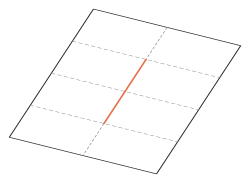
Согните лист по всем пунктирным линиям в обе стороны, чтобы сгибы стали мягкими.
Сложите лист пополам поперёк: верхний край к нижнему.
От сгиба разрежьте по сплошной линии в центре до следующего сгиба.
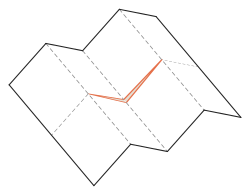
Разверните и сложите лист пополам вдоль, по центральной линии.
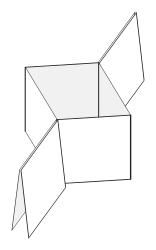
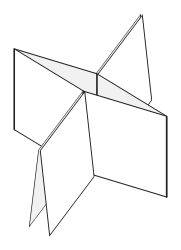
Сдвиньте верхний и нижний края к середине: разрез раскроется ромбом. Сожмите до конца и сложите книжечку так, чтобы страница 1 оказалась обложкой.
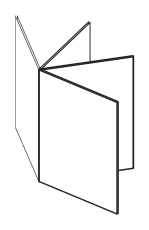
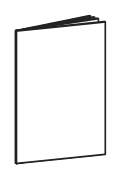
1. Лист после печати2. Согнут по сгибам, разрез сделан3. Сложен вдоль, концы сдвинуты к середине4. Получился крест: сложите его стопкой5. Книжка, страницы ещё полураскрыты6. Готово
Откуда взялся Foldlet
Идея взята с сайта pocketmod.com: карманная книжечка, сложенная из одного листа. Со временем он стал для меня менее удобным: появилось много рекламы, понадобилась регистрация. Поэтому я сделал свой вариант — бесплатный, без рекламы и без регистрации.
With Foldlet you can make and print a pocket notebook: for notes, or for reference information you want to keep at hand, such as timetables, lists, phone numbers or loyalty card codes.
Foldlet turns one A4 sheet into a pocket booklet: 8 small pages on one side, 16 if you print on both sides. Everything runs in your browser; nothing is uploaded anywhere.
Quick start
Click a page and type right on it.
The panel on the left has formatting buttons, colors and ready-made page layouts.
Click Print / Save PDF, print, and fold the sheet (see below).
Editing
Pages are shown in reading order, 1–16. Click a page to see its source text; click elsewhere to see the result.
The Format buttons work on the page you're editing, or, if none is open, on the last page you clicked.
On the printed sheet the pages are rotated and out of order. That's expected; folding puts them in order.
Show page numbers hides or shows the page numbers; without them each page has a little more room.
Uncheck Back side (pages 9–16) for an 8-page booklet: the back side disappears from the screen and from printing. Its text is kept and comes back when you check the box again.
Pick the site language at the top right: English, Русский or Esperanto. It also sets the words presets print: month names, titles.
Formatting
You type
You get
**bold**
bold
*italic* or _italic_
italic
- item
a bullet list
1. item
a numbered list
--- on its own line
splits the page into equal-height parts
{red}text{/red}
colored text
| a | b |
a table (see below)
![caption][img-1]
a picture (see below)
Colors: red, orange, yellow, green, blue, purple, pink, gray. A color works within one line and combines with bold: **{blue}Title{/blue}**. The Format panel's buttons do all of this for you: B and I wrap the selected text, the list buttons turn the selected lines into a bullet or numbered list (press again to undo it), the divider button inserts a --- line, the table and picture buttons insert a table or a picture, and the color dots color the selection. They work on the page you're editing, or, if none is open, on the last page you clicked.
Tables
Every table line starts with |, with | between cells. If the second line is dashes (|---|---|), the first line becomes the header. Colons in the dash line align a column: :--- left, :---: center, ---: right. Bold, italic and colors work inside cells. The table button in the panel inserts a starter table.
Use the picture button in the panel, paste with Ctrl+V, or drop a file onto a page.
The page gets a line like ![][img-1]: a reference to the picture. You can put a caption for yourself in the brackets: ![cat][img-1].
A picture from the web:  (needs internet when printing).
A picture takes a line of its own, is never wider than the page, and shrinks if it doesn't fit the height.
Large photos are scaled down automatically to a size that's still plenty for print.
Export MD saves the pictures into the same file, at the end, and Import MD loads them back.
Page presets
Click a page (it gets highlighted and its number shows in the Preset panel's heading), then pick a layout: it appears on the page right away. If the page has text of its own, Foldlet asks before replacing it (the Ask before a preset replaces text box in the View panel); a page holding only a preset is swapped without asking. The choice stays when you move to a page without a preset: press Apply to page N to put the same one there. No preset clears the page. A preset is one line in the page's text: you can edit it by hand, and it's saved in the .md.
Preset
Line
Calendar
{{calendar 2026-11 month mon}}. View: month, 3months (previous, this and next), week (a row per day; the date is any day of it, 2026-11-25), year (2026). mon or sun: the first day of the week. No date = today
Paper
{{grid}} grid, {{lines}} lined, {{dots}} dots, {{iso}} isometric grid, {{isodots}} isometric dots, {{hex}} honeycomb. Add a step in mm as a number: {{grid 4}}; without it grid and dots are 5 mm, lined 7 mm, isometric 6 mm, honeycomb 7 mm. One entry in the panel; pick the kind and step below it
Checklist
{{checklist}}
Eisenhower matrix
{{eisenhower}}: four boxes by urgent / important: do now, schedule, delegate, drop
Decision
{{decision}}: a "Decision" line on top, then two columns, pros and cons. You can name it right away: {{decision Move to Berlin}}
Gratitude journal
{{gratitude}}: a page for one day: date, what I'm grateful for, the best moment, mood (circle a face)
Shared expenses
{{expenses 3}} or {{expenses Anna, Boris, Vika}}: 2–4 people. Each row: what, amount, who paid, and ticks for who shares it. Below, a balance per person: paid − share
Maze
{{maze 483920 medium}}: a seed number and the size (small, medium, large). New maze draws a new one
Wheel of life
{{wheel Health, Career, Money, ...}}
Sudoku
{{sudoku 483920 medium 4}}: a seed number, the level (easy, medium, hard) and how many per page (1, 2, 4 or 6). Each has exactly one solution. New sudoku makes new ones
Yatzy
{{yatzy 4}}: a score sheet for 1–6 players; each row has a small hint on how it scores
QR code / barcode
{{barcode 4006381333931 | Shop}}: a loyalty card barcode with a caption: EAN-13, EAN-8 or UPC-A when the digits have a valid check digit, otherwise Code 128. {{qr https://foldlet.app | Caption}}: a QR code for any text or link. Print at 100% scale so scanners can read it
In case of emergency
{{ice}}: an ICE card: owner, emergency contact and phone, blood type, allergies, contraindications, consent to or refusal of organ donation, date and signature. Everything but the signature can be filled in in the panel and is then printed; what you leave empty stays a line or tick boxes for a pen. The blood type prints in both notations: "B (III) Rh+"
Crossword
50 ready-made crosswords in Russian, plus a joke one, No. 51, "after Pushkin": {{crossword 7}} the grid, {{crossword 7 clues}} the clues, {{crossword 7 answers}} the answers (printed upside down, so nobody reads them by accident). Put the clues on the facing page of a spread: 2 and 3, 4 and 5, 6 and 7; the answers on a page of their own, such as the last one
Word search
50 ready-made word searches, in Russian: {{filword 7}} a grid of letters and the words to find (across, down and diagonally); {{filword 7 answers}} the answers, also upside down
Chess opening
10 openings, each on a spread: {{opening 1}} the diagram and moves, {{opening 1 ideas}} White's and Black's ideas for the facing page. Short notation (Nf3) or full (Ng1-f3, add long); piece letters follow the site language
Chess board
{{chess}} the starting position, {{chess empty}} an empty board, {{chess FEN | Caption}} any position, such as a "mate in 2" puzzle. Copy the FEN from Lichess or Chess.com
Chess score sheet
{{scoresheet}}: players, event, round, date, result and 40 moves
Mandala to color
{{mandala 483920}}: the number sets the pattern. New mandala draws a new one; keep the number to keep one you like
100 hours
{{hours 2026-11-25 14:30 squares marks hints}}
100 days
{{days 2026-11-25 circles marks hints}}
You can write text above a preset, such as a title: the preset takes the remaining space.
100 hours / 100 days is a 10 × 10 grid, one cell per hour or day, to shade in with a pencil. Words after hours/days: the start date (and time, for hours) — leave it out to get blank Start/End lines to fill in by hand; squares or circles — the cell shape; marks — mark where each new day (hours) or month (days) begins; hints — pale hints in the cells: the time each hour ends, or the day of the month.
Files
Export MD saves all 16 pages into one content.md file, split by headings ## 1 … ## 16.
Import MD loads such a file back. Pages without a heading are left blank; if a number repeats, Foldlet warns you.
Nothing is saved automatically: Export MD before closing the tab.
Printing
Click Print / Save PDF and in the print dialog choose:
Paper A4, margins None, scale 100%;
turn off headers and footers, turn on Background graphics, or the fold lines won't print.
You get 2 pages: the front side (1–8) and the back side (9–16). For one side only, print just the first page. For double-sided printing either flip mode works: long edge or short edge.
How to fold
Crease the sheet along every dashed line, both ways, so the folds are soft.
Fold the sheet in half crosswise: top edge to bottom edge.
From the fold, cut along the solid line in the middle up to the next crease.
Unfold, then fold the sheet in half lengthwise along the center line.
Push the top and bottom ends toward the middle: the cut opens into a diamond. Push all the way and fold the booklet so page 1 is the cover.
1. The printed sheet2. Creased, with the cut made3. Folded lengthwise, ends pushed to the middle4. The cross: fold it into a stack5. A booklet, pages still half open6. Done
Where Foldlet comes from
The idea comes from pocketmod.com: a pocket booklet folded from a single sheet. Over time it became less convenient for me, with lots of ads and a required sign-up, so I made my own version: free, with no ads and no sign-up.
Per Foldlet vi povas prepari kaj presi poŝan notlibron: por notoj aŭ por informoj, kiujn vi volas havi ĉe mano, ekzemple horarojn, listojn, telefonnumerojn aŭ kodojn de lojalecaj kartoj.
Foldlet faras el unu A4-folio poŝan libreton: 8 malgrandajn paĝojn sur unu flanko, 16 se vi presas sur ambaŭ flankoj. Ĉio funkcias en via retumilo; nenio estas sendata ien ajn.
Rapida komenco
Alklaku paĝon kaj tajpu rekte sur ĝi.
La panelo maldekstre havas butonojn por formatado, kolorojn kaj pretajn ŝablonojn de paĝoj.
Alklaku Presi / PDF, presu kaj faldu la folion (vidu sube).
Redaktado
La paĝoj estas montrataj laŭ la legordo, 1–16. Alklaku paĝon por vidi ĝian fontan tekston; alklaku aliloke por vidi la rezulton.
La butonoj de Formato agas sur la redaktata paĝo aŭ, se neniu estas malfermita, sur la laste alklakita.
Sur la presita folio la paĝoj estas turnitaj kaj ne laŭorde. Tiel devas esti: la faldado metas ilin en ordon.
Montri paĝnumerojn kaŝas aŭ montras la paĝnumerojn; sen ili ĉiu paĝo havas iom pli da spaco.
Malmarku Dorsa flanko (paĝoj 9–16) por 8-paĝa libreto: la dorsa flanko malaperas de la ekrano kaj el la presado. Ĝia teksto restas kaj revenas, kiam vi remarkas la skatolon.
Elektu la lingvon de la retejo supre dekstre: English, Русский aŭ Esperanto. Ĝi ŝanĝas ankaŭ la vortojn, kiujn presas la ŝablonoj: nomojn de monatoj, titolojn.
Formatado
Vi tajpas
Vi ricevas
**grasa**
grasa
*kursiva* aŭ _kursiva_
kursiva
- ero
bula listo
1. ero
numerita listo
--- sur aparta linio
dividas la paĝon en egale altajn partojn
{red}teksto{/red}
kolora teksto
| a | b |
tabelo (vidu sube)
![subskribo][img-1]
bildo (vidu sube)
Koloroj: red, orange, yellow, green, blue, purple, pink, gray. Koloro validas ene de unu linio kaj kombiniĝas kun grasa: **{blue}Titolo{/blue}**. La butonoj de la panelo Formato faras ĉion ĉi por vi: B kaj I ĉirkaŭas la elektitan tekston, la listaj butonoj faras el la elektitaj linioj bulan aŭ numeritan liston (premu denove por malfari ĝin), la dividila butono enmetas linion ---, la tabela kaj la bilda butonoj enmetas tabelon aŭ bildon, kaj la koloraj punktoj kolorigas la elektitaĵon. Ili agas sur la redaktata paĝo aŭ, se neniu estas malfermita, sur la laste alklakita.
Tabeloj
Ĉiu linio de tabelo komenciĝas per |, kun | inter la ĉeloj. Se la dua linio konsistas el streketoj (|---|---|), la unua linio fariĝas kaplinio. Dupunktoj en la streketa linio ĝisrandigas kolumnon: :--- maldekstren, :---: centren, ---: dekstren. Grasa, kursiva kaj koloroj funkcias en la ĉeloj. La tabela butono en la panelo enmetas komencan tabelon.
Uzu la bildan butonon en la panelo, algluu per Ctrl+V aŭ demetu dosieron sur paĝon.
La paĝo ricevas linion kiel ![][img-1]: referencon al la bildo. En la krampoj vi povas skribi subskribon por vi mem: ![kato][img-1].
Bildo el la reto:  (bezonas interreton dum presado).
Bildo okupas tutan linion, neniam estas pli larĝa ol la paĝo kaj malgrandiĝas, se ĝi ne eniras laŭ la alto.
Grandaj fotoj aŭtomate malgrandiĝas al grandeco, kiu ankoraŭ bone sufiĉas por presado.
Eksporti MD konservas la bildojn en la saman dosieron, ĉe la fino, kaj Importi MD reŝargas ilin.
Ŝablonoj de paĝoj
Alklaku paĝon (ĝi estas emfazita, kaj ĝia numero aperas en la titolo de la panelo Ŝablono), poste elektu aranĝon: ĝi tuj aperas sur la paĝo. Se la paĝo havas propran tekston, Foldlet demandas antaŭ ol anstataŭigi ĝin (la skatolo Demandi antaŭ ol ŝablono anstataŭigas tekston en la panelo Vido); paĝon kun nur ŝablono ĝi ŝanĝas sen demando. La elekto restas, kiam vi iras al paĝo sen ŝablono: premu Apliki al paĝo N por meti la saman ankaŭ tien. Sen ŝablono malplenigas la paĝon. Ŝablono estas unu linio en la teksto de la paĝo: vi povas redakti ĝin mane, kaj ĝi konserviĝas en la .md.
Ŝablono
Linio
Kalendaro
{{calendar 2026-11 month mon}}. Vido: month (monato), 3months (la antaŭa, ĉi tiu kaj la sekva), week (semajno, po linio por tago; la dato estas iu ajn tago de ĝi, 2026-11-25), year (jaro, 2026). mon aŭ sun: la unua tago de la semajno. Sen dato: hodiaŭ
Liniigo
{{grid}} krado, {{lines}} linioj, {{dots}} punktoj, {{iso}} izometria krado, {{isodots}} izometriaj punktoj, {{hex}} vaksĉelaro. La paŝon en milimetroj donu kiel nombron: {{grid 4}}; sen ĝi krado kaj punktoj estas 5 mm, linioj 7 mm, izometrio 6 mm, vaksĉelaro 7 mm. En la panelo ĝi estas unu ero; la specon kaj paŝon elektu sub ĝi
Kontrollisto
{{checklist}}
Matrico de Eisenhower
{{eisenhower}}: kvar kestoj laŭ urĝa / grava: fari tuj, plani, delegi, forlasi
Decido
{{decision}}: supre linio «Decido», sub ĝi du kolumnoj: por kaj kontraŭ. Vi povas tuj skribi, kion vi decidas: {{decision Translokiĝo al Berlino}}
Taglibro de dankemo
{{gratitude}}: paĝo por unu tago: dato, pro kio mi dankas, la plej bona momento, humoro (rondigu vizaĝon)
Komunaj elspezoj
{{expenses 3}} aŭ {{expenses Anna, Boris, Vika}}: 2–4 homoj. En ĉiu linio: kio, sumo, kiu pagis kaj markoj por tiuj, kiuj dividas ĝin. Sube, saldo por ĉiu: pagis − parto
Labirinto
{{maze 483920 medium}}: semo-numero kaj la grandeco (small, medium, large). Nova labirinto desegnas novan
Rado de la vivo
{{wheel Sano, Kariero, Mono, ...}}
Sudoko
{{sudoku 483920 medium 4}}: semo-numero, la nivelo (easy, medium, hard) kaj kiom po paĝo (1, 2, 4 aŭ 6). Ĉiu havas ekzakte unu solvon. Nova sudoko faras novajn
Yatzy
{{yatzy 4}}: poentfolio por 1–6 ludantoj; ĉiu linio havas etan sugeston, kiel ĝi kalkuliĝas
QR-kodo / strikodo
{{barcode 4006381333931 | Butiko}}: strikodo de lojaleca karto kun subskribo: EAN-13, EAN-8 aŭ UPC-A, se la ciferoj havas ĝustan kontrolciferon, alie Code 128. {{qr https://foldlet.app | Subskribo}}: QR-kodo por ajna teksto aŭ ligilo. Presu je 100 %, por ke skaniloj povu legi ĝin
Okaze de krizo
{{ice}}: ICE-karto: posedanto, kontaktpersono kaj telefono, sangogrupo, alergioj, kontraŭindikoj, konsento aŭ rifuzo pri organdonaco, dato kaj subskribo. Ĉion krom la subskribo eblas plenigi en la panelo, kaj tiam ĝi presiĝas; kion vi lasas malplena, restas linio aŭ markeskvadratoj por plumo. La sangogrupo presiĝas en ambaŭ notacioj: «B (III) Rh+»
Krucvortenigmo
50 pretaj krucvortenigmoj en la rusa kaj ŝerca n-ro 51 «laŭ Puŝkin»: {{crossword 7}} la krado, {{crossword 7 clues}} la demandoj, {{crossword 7 answers}} la respondoj (presitaj renversite, por ke neniu legu ilin hazarde). Metu la demandojn sur la kontraŭan paĝon de duopaĝo: 2 kaj 3, 4 kaj 5, 6 kaj 7; la respondojn sur apartan paĝon, ekzemple la lastan
Vortserĉo
50 pretaj vortserĉoj en la rusa: {{filword 7}} krado de literoj kaj la vortoj por trovi (horizontale, vertikale kaj diagonale); {{filword 7 answers}} la respondoj, ankaŭ renversitaj
Ŝakmalfermaĵo
10 malfermaĵoj, ĉiu sur duopaĝo: {{opening 1}} la diagramo kaj movoj, {{opening 1 ideas}} la ideoj de blanko kaj nigro por la kontraŭa paĝo. Mallonga notacio (Ĉf3) aŭ plena (Ĉg1–f3, aldonu long); la literoj de la pecoj sekvas la lingvon de la retejo
Ŝaktabulo
{{chess}} la komenca pozicio, {{chess empty}} malplena tabulo, {{chess FEN | Subskribo}} ajna pozicio, ekzemple problemo «mato en 2». Kopiu la FEN el Lichess aŭ Chess.com
Ŝakpartia registro
{{scoresheet}}: ludantoj, turniro, rondo, dato, rezulto kaj 40 movoj
Kolorigebla mandalo
{{mandala 483920}}: la numero difinas la desegnon. Nova mandalo desegnas novan; konservu la numeron por konservi tiun, kiu plaĉas al vi
100 horoj
{{hours 2026-11-25 14:30 squares marks hints}}
100 tagoj
{{days 2026-11-25 circles marks hints}}
Vi povas skribi tekston super ŝablono, ekzemple titolon: la ŝablono okupas la restantan spacon.
100 horoj / 100 tagoj estas krado 10 × 10, po unu ĉelo por horo aŭ tago, por kolorigi per krajono. Vortoj post hours/days: la komenca dato (kaj horo, por horoj) — preterlasu ĝin por ricevi malplenajn liniojn Komenco/Fino por mana plenigo; squares aŭ circles — la formo de la ĉeloj; marks — marki, kie komenciĝas ĉiu nova tago (horoj) aŭ monato (tagoj); hints — palaj sugestoj en la ĉeloj: la horo, kiam finiĝas ĉiu horo, aŭ la tago de la monato.
Dosieroj
Eksporti MD konservas ĉiujn 16 paĝojn en unu dosieron content.md, dividitan per titoloj ## 1 … ## 16.
Importi MD reŝargas tian dosieron. Paĝoj sen titolo restas malplenaj; se numero ripetiĝas, Foldlet avertas vin.
Nenio konserviĝas aŭtomate: eksportu MD antaŭ ol fermi la langeton.
Presado
Alklaku Presi / PDF kaj en la presa dialogo elektu:
paperon A4, marĝenojn Neniuj, skalon 100%;
malŝaltu kaplinion kaj piedlinion, ŝaltu Fonaj grafikaĵoj, alie la faldaj linioj ne presiĝos.
Vi ricevas 2 paĝojn: la antaŭan flankon (1–8) kaj la dorsan (9–16). Por nur unu flanko presu nur la unuan paĝon. Por dueflanka presado ambaŭ manieroj de turnado funkcias: laŭ la longa aŭ laŭ la mallonga rando.
Kiel faldi
Faldu la folion laŭ ĉiu streketa linio, ambaŭdirekte, por ke la faldoj moliĝu.
Faldu la folion duone laŭlarĝe: la supran randon al la malsupra.
De la faldo tranĉu laŭ la plena linio en la mezo ĝis la sekva faldo.
Malfaldu, poste faldu la folion duone laŭlonge, laŭ la meza linio.
Puŝu la supran kaj la malsupran finojn al la mezo: la tranĉo malfermiĝas kiel rombo. Puŝu ĝis la fino kaj faldu la libreton tiel, ke paĝo 1 estu la kovrilo.
1. La presita folio2. Faldita laŭ la faldoj, kun la tranĉo3. Faldita laŭlonge, la finoj puŝitaj al la mezo4. La kruco: faldu ĝin en stakon5. Libreto, la paĝoj ankoraŭ duone malfermitaj6. Preta
De kie venas Foldlet
La ideo venas de pocketmod.com: poŝa libreto faldita el unu folio. Kun la tempo ĝi fariĝis malpli oportuna por mi: aperis multe da reklamoj kaj necesas registriĝo. Tial mi faris mian propran version: senpagan, sen reklamoj kaj sen registriĝo.
Новые шаблоны: QR-код / штрих-код для карт лояльности и карточка «На экстренный случай», которую можно заполнить прямо в панели.
Разлиновка: можно задать шаг в миллиметрах; новые изометрические точки; шестиугольники теперь называются сотами.
Версия сайта внизу страницы и этот список изменений.
Справка начинается с того, зачем нужен Foldlet.
50 кроссвордов и 50 филвордов на русском, ответы печатаются вверх ногами. И шуточный кроссворд № 51 «По мотивам поэзии Пушкина».
Шахматы: 10 дебютов на развороте (диаграмма и ходы, идеи), доска с любой позицией и бланк записи партии.
Новый адрес: foldlet.app. Старые ссылки продолжают работать.
2026.11.28
Шаблоны: судоку, мандала, Yatzy, матрица Эйзенхауэра, решение, дневник благодарности, лабиринт, общие траты; разлиновки собраны в один пункт, добавлены изометрическая сетка и соты.
Календарь: месяц, 3 месяца, неделя или год; неделя с понедельника или с воскресенья.
Весь сайт на английском, русском и эсперанто.
Картинки, как складывать, в справке и на боковой панели.
Пример показывает разные шаблоны на каждой странице.
Свой адрес: foldlet.0at.ru.
2026.11.27
Новый редактор Foldlet: страницы по порядку чтения, цвета, таблицы, картинки, справка.
Трекер «100 часов / 100 дней».
2026.11.23
Первые шаблоны: календарь, клетка, точки, линейка, чек-лист, колесо баланса.
Исправления печати.
2026.09.18
Первая версия: один лист A4, восемь страниц, двусторонняя печать, простая разметка.
What's new
2026.11.29
New presets: QR code / barcode for loyalty cards, and an "In case of emergency" card you can fill in right in the panel.
Paper: set the step in mm; new isometric dots; hexagons are now called honeycomb.
The site version at the bottom of the page, and this list of changes.
The help starts with what Foldlet is for.
50 crosswords and 50 word searches in Russian, answers print upside down. Plus a joke crossword, No. 51, "after Pushkin".
Chess: 10 openings on spreads (diagram and moves, ideas), a board with any position and a score sheet.
A new address: foldlet.app. Old links keep working.
2026.11.28
Presets: sudoku, mandala, Yatzy, Eisenhower matrix, decision, gratitude journal, maze, shared expenses; paper rulings in one menu with isometric and hex grids.
Calendar: month, 3 months, week or year; the week starts on Monday or Sunday.
The whole site in English, Russian and Esperanto.
Folding pictures in the help and the side panel.
The demo booklet shows a different preset on every page.
Its own address: foldlet.0at.ru.
2026.11.27
The new Foldlet editor: pages in reading order, colors, tables, pictures, help.
The 100 hours / 100 days tracker.
2026.11.23
First presets: calendar, grid, dots, lined paper, checklist, wheel of life.
Printing fixes.
2026.09.18
The first version: one A4 sheet, eight pages, double-sided printing, a markdown subset.
Kio novas
2026.11.29
Novaj ŝablonoj: QR-kodo / strikodo por lojalecaj kartoj kaj karto «Okaze de krizo», kiun eblas plenigi rekte en la panelo.
Liniigo: eblas doni la paŝon en milimetroj; novaj izometriaj punktoj; sesanguloj nun nomiĝas vaksĉelaro.
La versio de la retejo sube de la paĝo kaj ĉi tiu listo de ŝanĝoj.
La helpo komenciĝas per tio, por kio utilas Foldlet.
50 krucvortenigmoj kaj 50 vortserĉoj en la rusa, la respondoj presiĝas renversite. Kaj ŝerca krucvortenigmo n-ro 51 «laŭ Puŝkin».
Ŝako: 10 malfermaĵoj sur duopaĝoj (diagramo kaj movoj, ideoj), tabulo kun ajna pozicio kaj partiregistro.
Nova adreso: foldlet.app. Malnovaj ligiloj plu funkcias.
2026.11.28
Ŝablonoj: sudoko, mandalo, Yatzy, matrico de Eisenhower, decido, taglibro de dankemo, labirinto, komunaj elspezoj; liniigoj en unu menuo kun izometria kaj sesangula kradoj.
Kalendaro: monato, 3 monatoj, semajno aŭ jaro; la semajno komenciĝas lunde aŭ dimanĉe.
La tuta retejo en la angla, la rusa kaj Esperanto.
Bildoj pri faldado en la helpo kaj en la flanka panelo.
La ekzemplo montras malsaman ŝablonon sur ĉiu paĝo.
Propra adreso: foldlet.0at.ru.
2026.11.27
La nova redaktilo Foldlet: paĝoj laŭ legordo, koloroj, tabeloj, bildoj, helpo.
La spurilo «100 horoj / 100 tagoj».
2026.11.23
Unuaj ŝablonoj: kalendaro, krado, punktoj, linioj, kontrollisto, rado de la vivo.
Riparoj de presado.
2026.09.18
La unua versio: unu A4-folio, ok paĝoj, dueflanka presado, simpla markado.